BCA/BTech students-ന് വേണ്ടി ഒരു clear, project-based roadmap
എന്തുകൊണ്ട് ഈ Roadmap?
KCC-ൽ join ചെയ്യുന്ന പല students-നും ഒരു common പ്രശ്നം ഉണ്ട് — "programming എവിടെ നിന്ന് തുടങ്ങണം?" എന്നറിയില്ല. YouTube-ൽ 100 tutorials കാണും, ഒരു language-ൽ നിന്ന് വേറൊന്നിലേക്ക് jump ചെയ്യും, ഒടുവിൽ confusion മാത്രം ബാക്കിയാവും.
ഈ guide ഒരു step-by-step path ആണ്. ഇത് follow ചെയ്താൽ:
- എന്ത് പഠിക്കണം എന്ന ആശയക്കുഴപ്പം ഇല്ലാതാവും
- Tutorials മാത്രം കണ്ടിരിക്കാതെ actually build ചെയ്യാൻ പഠിക്കും
- ഒരു semester കൊണ്ട് ഒരു decent portfolio ready ആവും
Golden Rule: Don't chase 10 programming languages. Master one, build projects, stay consistent. Skills come from building — not just watching.
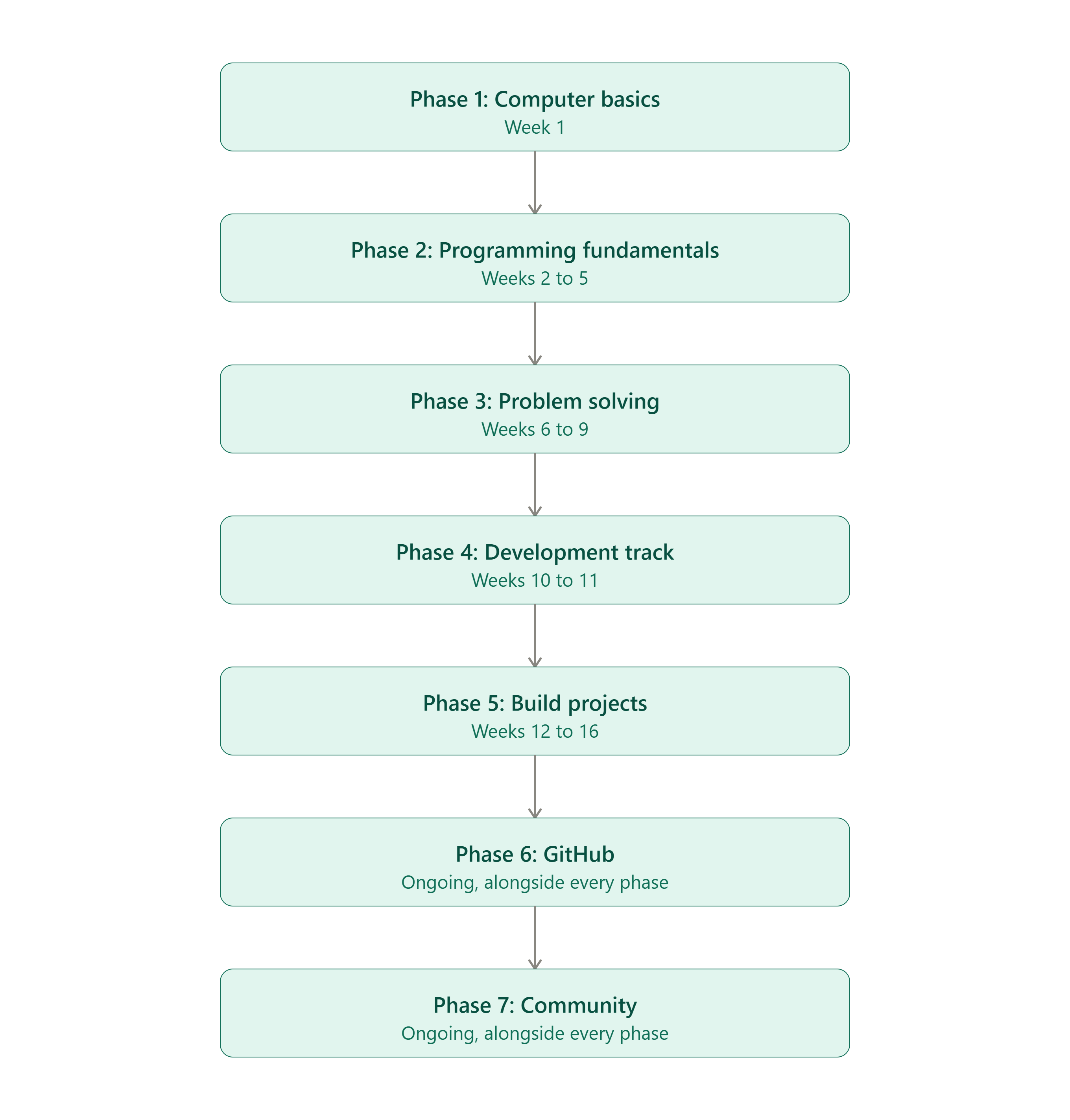
🚀 Phase 1: Computer Basics (Week 1)
Foundation ശരിയായില്ലെങ്കിൽ ബാക്കി എല്ലാം ബുദ്ധിമുട്ടാവും. ഈ week-ൽ ഇത് cover ചെയ്യണം:
Table View Available on Desktop
This comparison table is optimized for desktop view. Switch to a desktop screen to view it.
| Topic | എന്തിനുവേണ്ടി |
|---|---|
| Computer എങ്ങനെ work ചെയ്യുന്നു | CPU, RAM, Storage — basic mental model കിട്ടാൻ |
| Files & Folders | Project organize ചെയ്യാൻ അറിയണം |
| Command Line (Terminal) | cd, ls, mkdir, rm പോലുള്ള basic commands |
| VS Code install | Industry-standard code editor |
| Git & GitHub account | Code save ചെയ്യാനും share ചെയ്യാനും |
💡 Tip: Terminal പേടിക്കണ്ട. ദിവസവും 10 minutes practice ചെയ്താൽ ഒരാഴ്ച കൊണ്ട് comfortable ആവും.
Checklist ഇത് complete ആയോ എന്ന് നോക്കാൻ:
💻 Phase 2: Programming Fundamentals (Weeks 2–5)
ഒരു language മാത്രം തിരഞ്ഞെടുക്കുക — Python recommend ചെയ്യുന്നു (beginner-friendly syntax, huge community, versatile).
പഠിക്കേണ്ട Topics
- Variables & Data Types
- Input / Output
- Conditions (if/else)
- Loops (for/while)
- Functions
- Lists / Arrays
- Dictionaries
- Basic OOP (classes, objects)
🎯 Daily Practice: 1–2 മണിക്കൂർ
Weekly breakdown suggestion:
Table View Available on Desktop
This comparison table is optimized for desktop view. Switch to a desktop screen to view it.
| Week | Focus |
|---|---|
| Week 2 | Variables, data types, input/output, conditions |
| Week 3 | Loops + mini practice problems |
| Week 4 | Functions, lists, dictionaries |
| Week 5 | Basic OOP + review week |
💡 Common Mistake: ഒരു topic 100% perfect ആക്കാൻ കാത്തിരിക്കരുത്. 70% understanding ആയാൽ next topic-ലേക്ക് പോകുക, project ചെയ്യുമ്പോൾ ബാക്കി clear ആവും.
🧠 Phase 3: Problem Solving (Weeks 6–9)
ഇവിടെയാണ് real logic-building നടക്കുന്നത്.
Cover ചെയ്യേണ്ടത്:
- Basic Logic Building (swap numbers, factorial, prime check)
- Pattern Problems (stars, pyramids, number patterns)
- Arrays / Lists based problems
- String manipulation
- Function-based problem solving
- Easy DSA questions (searching, sorting basics)
🎯 Goal: ദിവസവും 2–3 problems solve ചെയ്യുക.
എവിടെ practice ചെയ്യാം:
- HackerRank (beginner track)
- LeetCode (Easy tag)
- CodeChef / GeeksforGeeks basic problems
💡 Tip: ഒരു problem 20 minutes ശ്രമിച്ചിട്ടും കിട്ടിയില്ലെങ്കിൽ solution നോക്കുക, പക്ഷെ സ്വന്തം കൈകൊണ്ട് വീണ്ടും type ചെയ്ത് solve ചെയ്യുക — copy-paste ചെയ്യരുത്.
🌐 Phase 4: Development Track (Weeks 10–11: Decide & Start)
ഇനി ഒരു domain തിരഞ്ഞെടുക്കുക. എല്ലാം ഒരുമിച്ച് പഠിക്കരുത്.
Table View Available on Desktop
This comparison table is optimized for desktop view. Switch to a desktop screen to view it.
| Domain | Suits ചെയ്യുന്നത് |
|---|---|
| Web Development | UI/UX interest, quick visible results ഇഷ്ടപ്പെടുന്നവർ (HTML, CSS, JS → React/Node) |
| App Development | Mobile apps build ചെയ്യാൻ താല്പര്യമുള്ളവർ (Flutter / Kotlin) |
| AI/ML | Math & data interest ഉള്ളവർ (Python, NumPy, Pandas, scikit-learn) |
| Cyber Security | Systems & security-mindset ഉള്ളവർ |
| Cloud / DevOps | Infrastructure, deployment interest ഉള്ളവർ |
💡 തിരഞ്ഞെടുക്കാൻ ബുദ്ധിമുട്ടുണ്ടെങ്കിൽ: Web Development-ൽ തുടങ്ങുന്നത് നല്ലതാണ് — foundational ആണ്, മറ്റ് domains-ലേക്കും easy transition സാധ്യമാണ്.
🛠️ Phase 5: Build Projects (Weeks 12–16)
Small → Medium → Large എന്ന order-ൽ progress ചെയ്യുക.
Project Ideas (Difficulty order)
- Calculator — basic logic + functions
- To-Do App — CRUD operations, local storage
- Weather App — API integration പഠിക്കാൻ
- Notes App — data persistence
- Expense Tracker — real-world use case, basic database
- Portfolio Website — എല്ലാം showcase ചെയ്യാൻ, ഇത് must-have ആണ്
💡 Rule of thumb: ഓരോ project-ലും ഒരു പുതിയ concept add ചെയ്യുക (e.g. To-Do App-ൽ local storage, Weather App-ൽ API calls). അപ്പോൾ project ചെയ്യുന്നതോടൊപ്പം പുതിയ skills-ഉം കൂടെ വരും.
📂 Phase 6: GitHub
ഓരോ project-വും GitHub-ൽ upload ചെയ്യുക. ഇത് നിങ്ങളുടെ public proof of work ആണ് — recruiters ഇത് നോക്കും.
- README എഴുതുക — project എന്താണ്, എങ്ങനെ run ചെയ്യാം, screenshots ഉണ്ടെങ്കിൽ കൂടുതൽ നല്ലത്
- Regular commits ചെയ്യുക — ഒരൊറ്റ commit-ൽ എല്ലാം push ചെയ്യുന്നതിനു പകരം, progress-ഓടെ commit ചെയ്യുക
- GitHub profile-ൽ pinned repositories set ചെയ്യുക — best 4–6 projects highlight ചെയ്യാൻ
💡 Tip: Green contribution graph "consistency"-യുടെ ഒരു visual proof ആണ്. ചെറിയ commits ആയാലും ദിവസവും ചെയ്യുന്നത് നല്ല habit ആണ്.
🎤 Phase 7: Community
Coding ഒരു solo journey ആയിരിക്കണ്ട.
- Doubts ചോദിക്കുക — മടിക്കാതെ
- മറ്റുള്ളവരുടെ code വായിക്കുക — ഇത് നല്ലൊരു learning method ആണ്
- Open Source contribute ചെയ്യാൻ ശ്രമിക്കുക — "good first issue" tag ഉള്ള repos search ചെയ്യുക
- Weekly coding challenges ചെയ്യുക — group-ആയി ചെയ്താൽ accountability കൂടും
📅 Recommended Daily Plan
Table View Available on Desktop
This comparison table is optimized for desktop view. Switch to a desktop screen to view it.
| Time | Activity |
|---|---|
| 30 min | Learn (video/article/docs) |
| 60 min | Code (project/practice) |
| 30 min | Practice Problems |
Total: ~2 മണിക്കൂർ/day — ഇത് consistent ആയി ചെയ്താൽ 4–5 മാസം കൊണ്ട് massive difference കാണാം.
❓ Frequently Asked Questions
Q: Python-നു പകരം വേറെ language തുടങ്ങാമോ? A: ആവാം. Java, C, JavaScript എല്ലാം OK ആണ്. പ്രധാനം language അല്ല, ഒന്ന് മാത്രം തിരഞ്ഞെടുത്ത് അതിൽ ഉറച്ചു നിൽക്കുക എന്നതാണ്.
Q: Tutorial കണ്ടിട്ടും ഒറ്റയ്ക്ക് code എഴുതാൻ പറ്റുന്നില്ല? A: ഇത് സാധാരണമാണ്. Tutorial കണ്ടതിനു ശേഷം, video close ചെയ്ത് അതേ project വീണ്ടും ഓർമ്മയിൽ നിന്ന് build ചെയ്യാൻ ശ്രമിക്കുക. ഇതാണ് "tutorial hell" -ൽ നിന്ന് രക്ഷപ്പെടാനുള്ള വഴി.
Q: ഒരു phase-ൽ stuck ആയാൽ അടുത്ത phase-ലേക്ക് പോകാമോ? A: Time-ബോക്സ് ചെയ്യുക. ഒരു phase-ൽ പ്ലാൻ ചെയ്തതിലും കൂടുതൽ time എടുക്കുന്നുണ്ടെങ്കിൽ, 80% cover ചെയ്തിട്ട് അടുത്തതിലേക്ക് move ചെയ്യുക. Projects ചെയ്യുമ്പോൾ gaps automatic ആയി fill ആവും.
Final Word
ഈ roadmap ഒരു "quick trick" അല്ല — ഇത് consistency-based ആണ്. Overnight results പ്രതീക്ഷിക്കരുത്. പക്ഷെ ഈ path follow ചെയ്ത്, ദിവസവും ഒരു ചെറിയ progress-ഉം ചെയ്താൽ, ഒരു semester കൊണ്ട് ഒരു confident, project-ready programmer ആയി മാറാം.
Start today. Build something small. Stay consistent.
— KCC Programming Guide: "Zero to Job Ready"