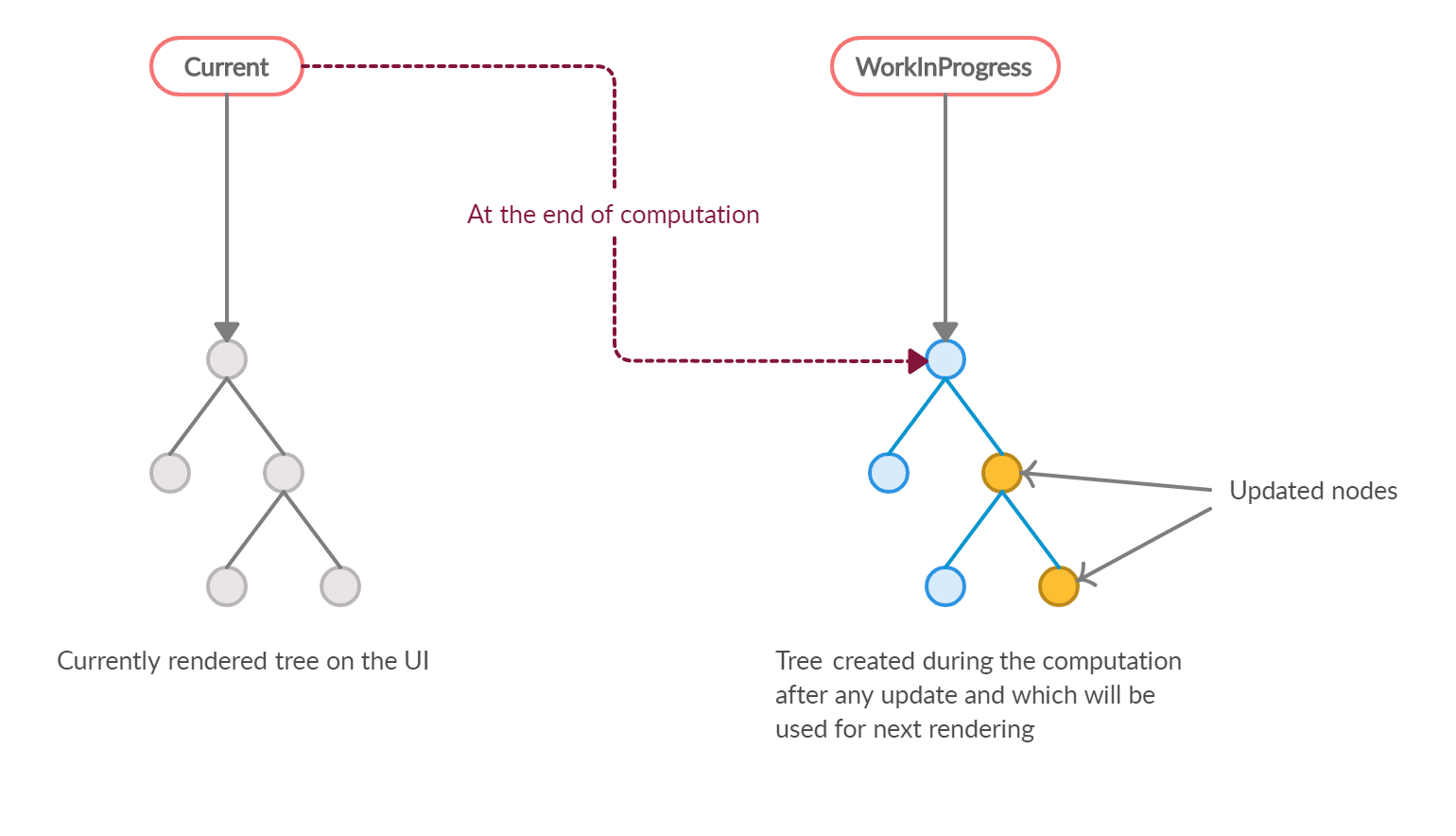
React primarily uses a Diffing Algorithm as part of its Reconciliation process.
This algorithm compares the current Virtual DOM with the previous Virtual DOM and determines the minimal number of changes required to update the real DOM.
This makes React extremely fast and efficient.
Understanding React’s Diffing Algorithm
When a component's state or props change, React performs the following steps:
- React creates a new Virtual DOM tree
- It compares this new tree with the previous Virtual DOM
- It calculates the difference (diff)
- It updates only the changed elements in the real DOM
This process is called Reconciliation.
Instead of updating the entire page, React updates only the parts that changed.
Why React Needs a Diffing Algorithm
Updating the real DOM directly is slow and expensive.
For example:
Imagine updating a list of 1000 elements.
Without a diffing strategy, the browser would need to:
- Remove all 1000 elements
- Recreate them again
But React does something smarter.
It finds exactly what changed and updates only that element.
How React Optimizes the Diffing Process
React makes two important assumptions to optimize performance.
1. Different Element Types Produce Different Trees
Example:
<div>
changing to
<span>
React destroys the old tree and builds a new one.
2. Keys Help Identify List Elements
When rendering lists, React uses keys to track elements efficiently.
Example:
{items.map(item => (
<li key={item.id}>{item.name}</li>
))}
Keys help React identify:
- which elements changed
- which moved
- which were removed
This dramatically improves rendering performance.
Why DFS, Dijkstra, or A* Are Not Used
Some developers think React uses algorithms like:
- Depth First Search (DFS)
- Dijkstra’s Algorithm
- A* Search
But these are used for graph traversal and pathfinding, not UI rendering.
React's algorithm is specifically designed for tree comparison and UI updates.
Complexity of React's Diffing Algorithm
A naive tree comparison would take:
O(n³) time complexity.
React optimizes this to approximately:
O(n)
This is why React applications scale well even with large component trees.
Virtual DOM vs Real DOM
Table View Available on Desktop
This comparison table is optimized for desktop view. Switch to a desktop screen to view it.
| Virtual DOM | Real DOM |
|---|---|
| Lightweight JavaScript object | Actual browser DOM |
| Fast to manipulate | Expensive to update |
| Used for comparison | Used for rendering |
React updates the Virtual DOM first, then applies the minimal changes to the Real DOM.
Real World Example
Imagine a React component:
<h1>Hello World</h1>
Later it updates to:
<h1>Hello InterviewKit</h1>
React does not re-render the entire element.
It simply updates:
textContent = "Hello InterviewKit"
This small optimization improves performance significantly.
Key Takeaways
✔ React uses a Diffing Algorithm
✔ It compares Virtual DOM trees
✔ The process is called Reconciliation
✔ Only changed elements are updated
✔ This keeps React apps fast and scalable